Hooks 与 MCP 协议
Hooks,事件驱动自动化
17 种 Hook 事件——完整生命周期覆盖
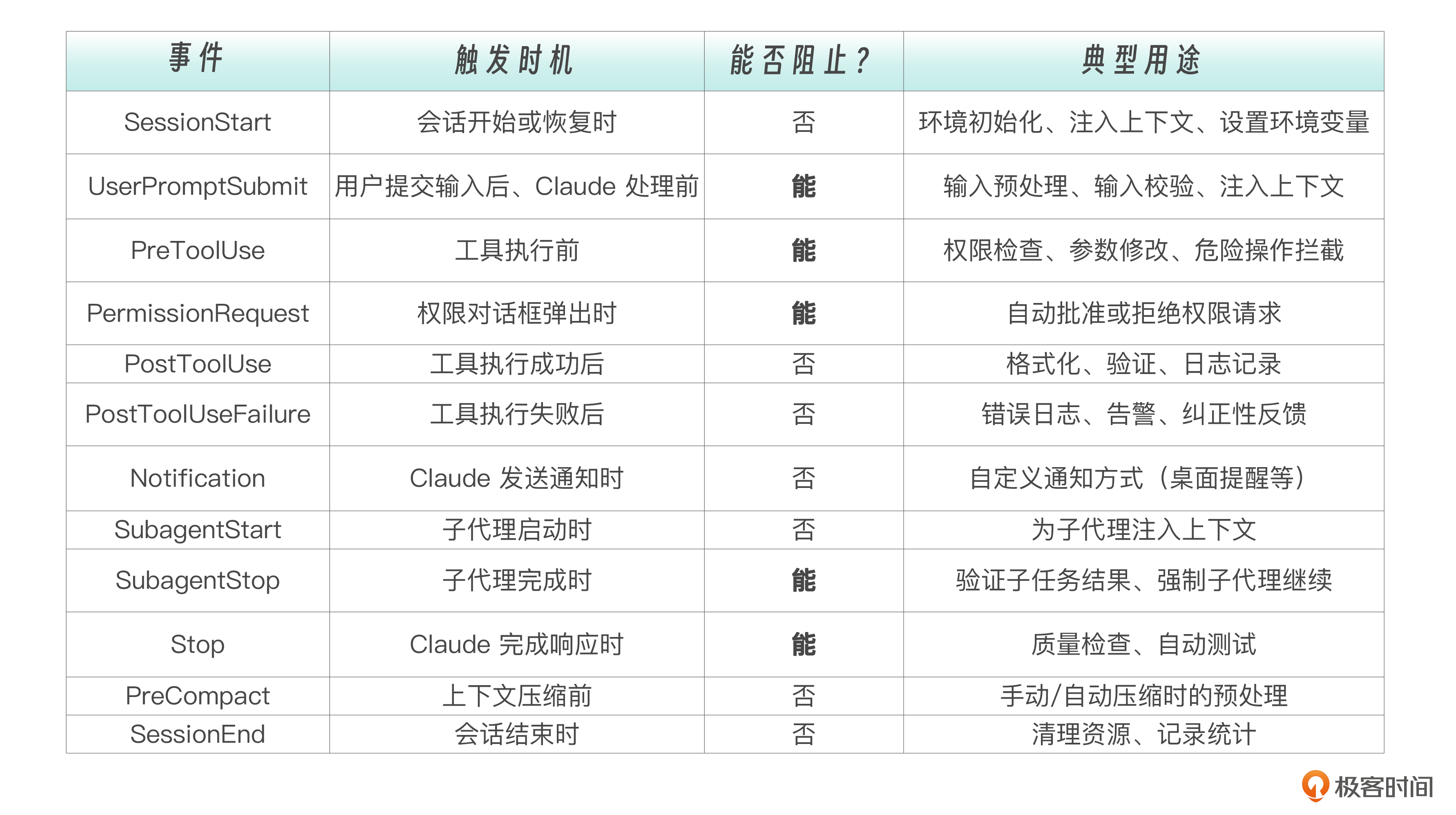
四种 Hook 执行类型
- Command 类型——执行 Shell 脚本
这是最常用、最可靠的类型。command可以是任何 shell 命令或脚本路径。timeout 指定超时时间(毫秒),默认 60 秒。Command 类型的优势在于确定性——同样的输入永远产生同样的输出,不存在 LLM 的随机性。一个正则表达式匹配 rm -rf /,要么匹配到,要么没匹配到,没有“可能”“大概”的中间地带。
Prompt 类型——LLM 评估 当规则无法用确定性脚本表达时,就需要 LLM 的判断力。Prompt 类型会用一个小型 LLM(通常是 Haiku)来评估当前情况。比如“这段代码是否有安全隐患”——这种判断需要理解代码语义,不是简单的模式匹配能解决的。但 Prompt 类型只能“看一眼就判断”,它无法主动去读取更多文件来辅助决策。
Agent 类型——子代理评估
这是最强大也最“重”的评估方式。Agent Hook 会启动一个子代理,这个子代理可以使用 Read、Grep、Glob 等工具来验证条件——不只是“看一眼就判断”,而是可以“翻代码确认”。比如验证“所有公共 API 都有文档注释”,需要子代理实际遍历代码文件才能做出准确判断。
Hooks 的本质是 AI Agent 的中间件。就像 Web 开发中的中间件可以拦截 HTTP 请求一样,Hooks 可以在 Claude 执行工具前后插入自定义逻辑。
Claude 不需要知道有 Hook 在运行,它只管专注于完成任务,安全防线、质量守卫、审计日志的工作,全部由 Hooks 在"幕后"自动完成。
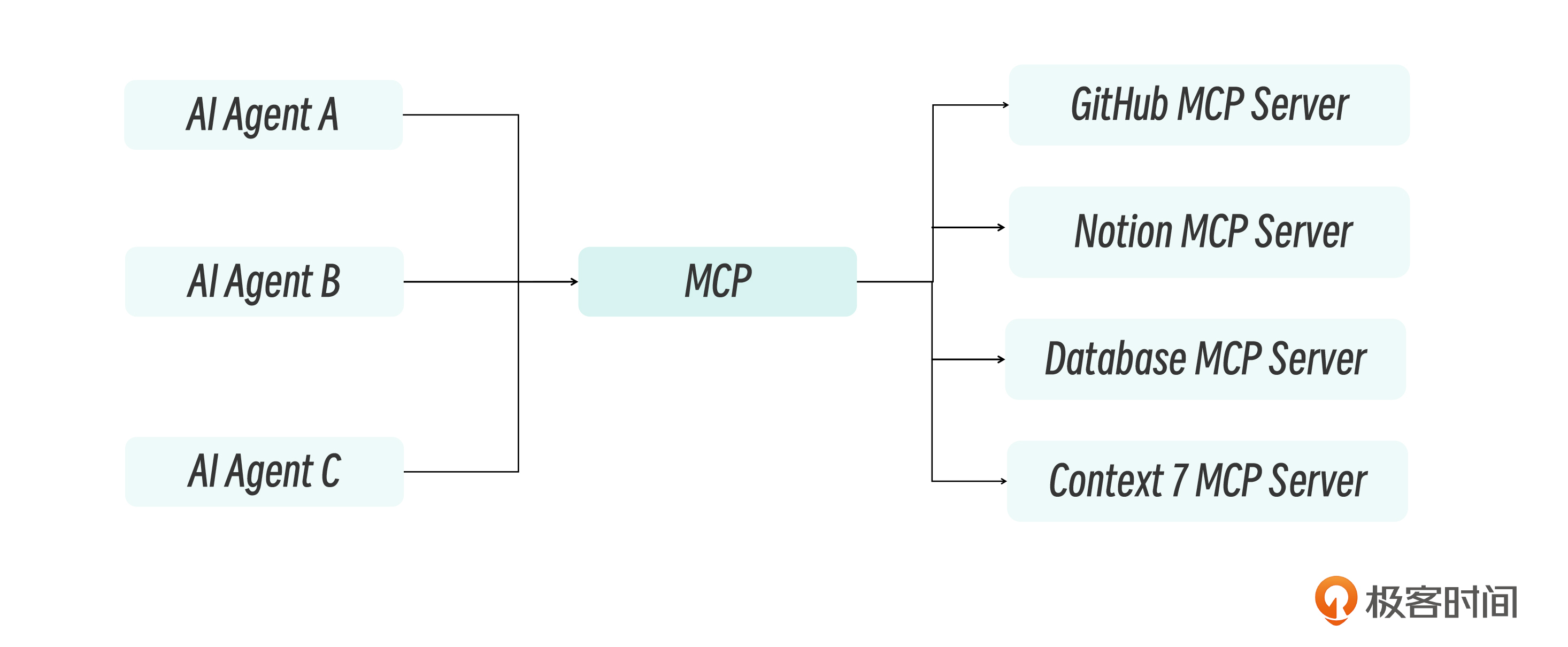
MCP——AI 的 USB-C 接口
在 MCP 出现之前,如果你想让 AI 助手连接外部服务,通常有两种选择: 自定义开发:为每个服务写专门的集成代码 平台绑定:依赖特定平台提供的插件(如 ChatGPT Plugins)
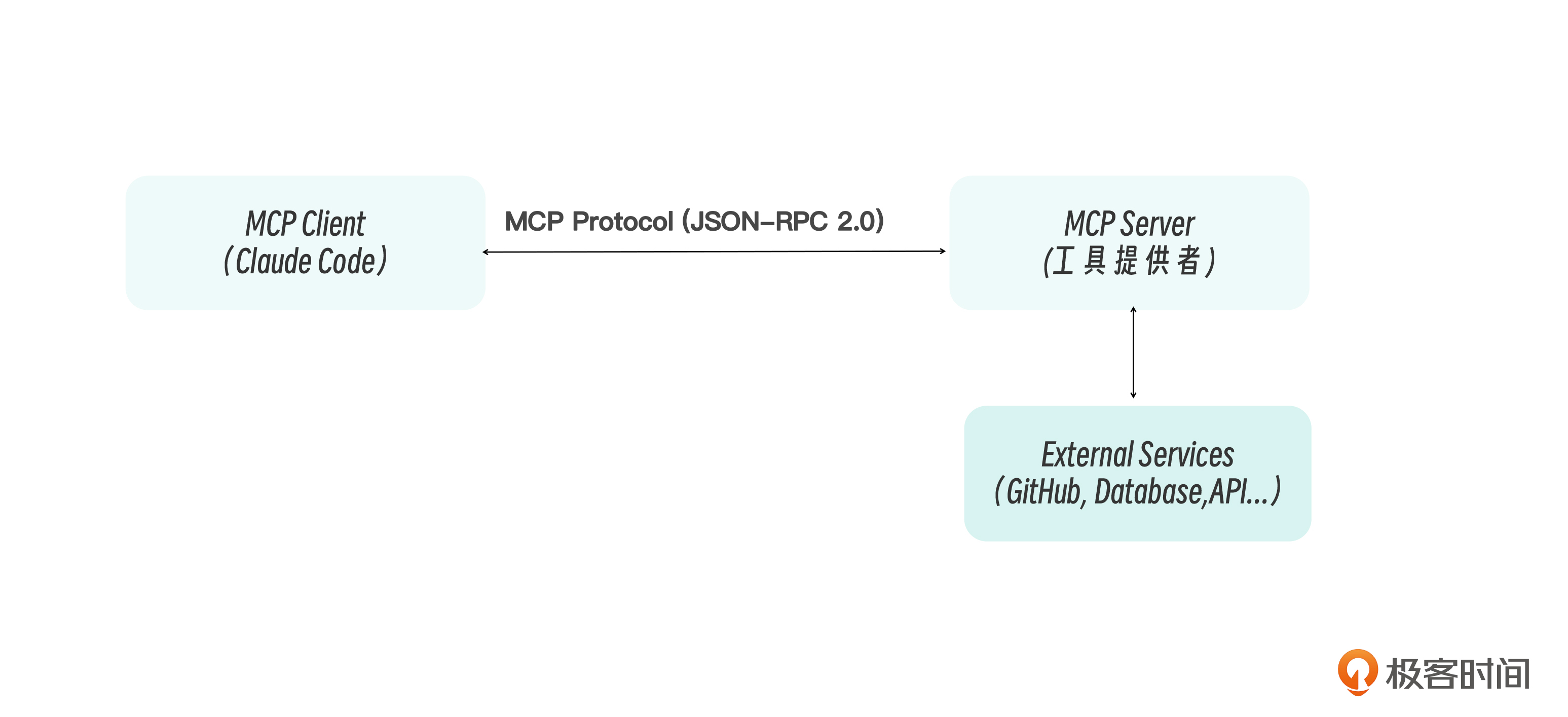
MCP 架构与核心概念
MCP 采用经典的客户端-服务器架构。Claude Code 充当 MCP Client,负责发现和调用工具;MCP Server 则暴露工具和资源,作为外部服务的代理。两者之间通过 JSON-RPC 2.0 协议通信
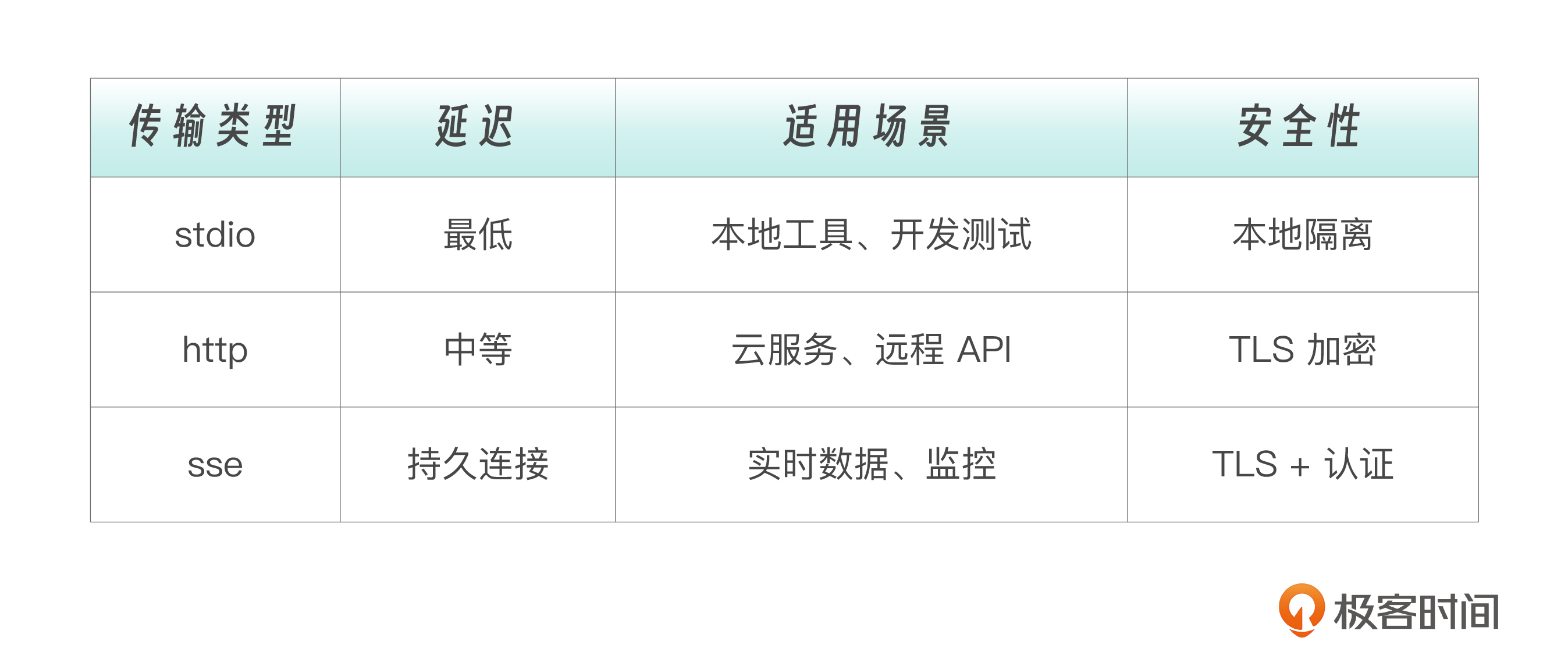
MCP的三种传输方式
- Stdio 传输(本地进程)
- HTTP 传输(推荐用于远程)
- SSE 传输(Server-Sent Events)
MCP的配置与管理
MCP 配置可以放在多个位置,每个位置的作用域和可见性不同。
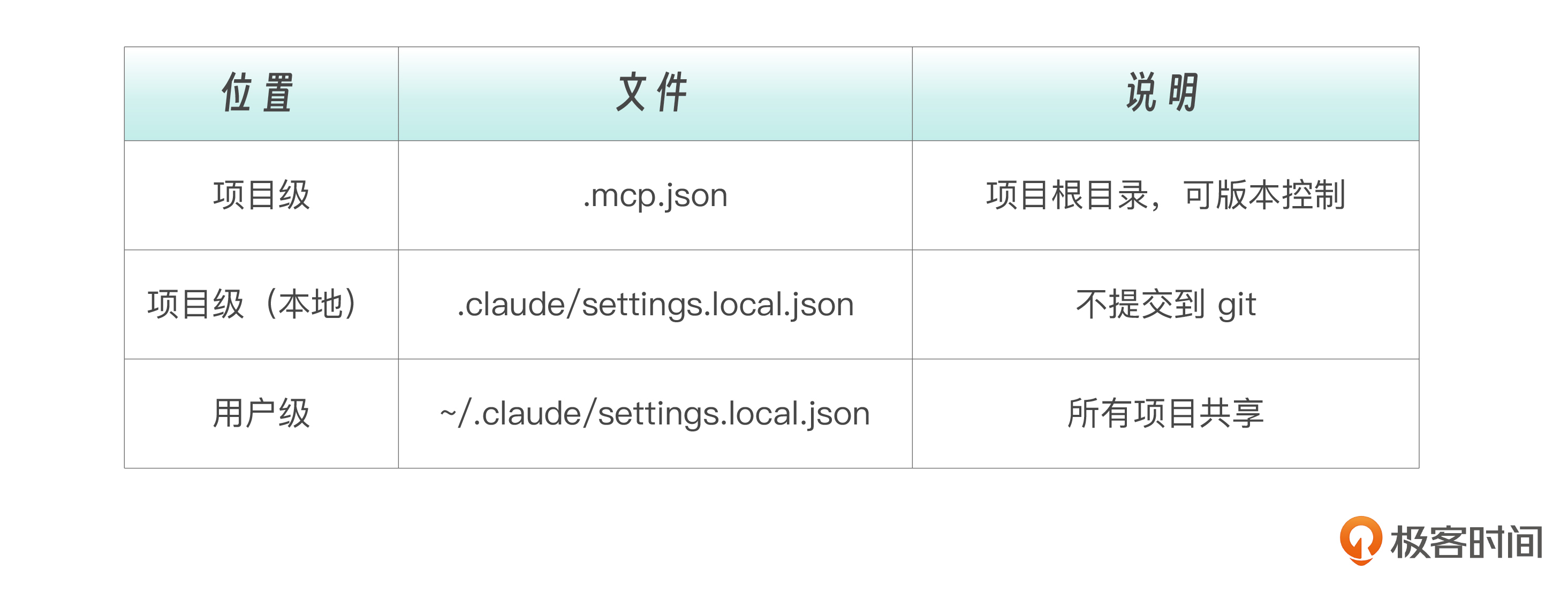
{
  "mcpServers": {
    "server-name": {
      "type": "stdio | sse | http",
      "command": "...",        // stdio 专用
      "args": ["..."],         // stdio 专用
      "url": "...",            // sse/http 专用
      "headers": {},           // sse/http 专用
      "env": {}                // 环境变量
    }
  }
}
Claude Code 里面的 MCP 配置示例
在配置文件中硬编码敏感信息是危险的。MCP 配置支持通过 ${} 语法引用环境变量:${VAR_NAME} 直接引用,变量不存在会报错;${VAR_NAME:-default} 在变量不存在时使用默认值:
实战:连接主流 MCP 服务
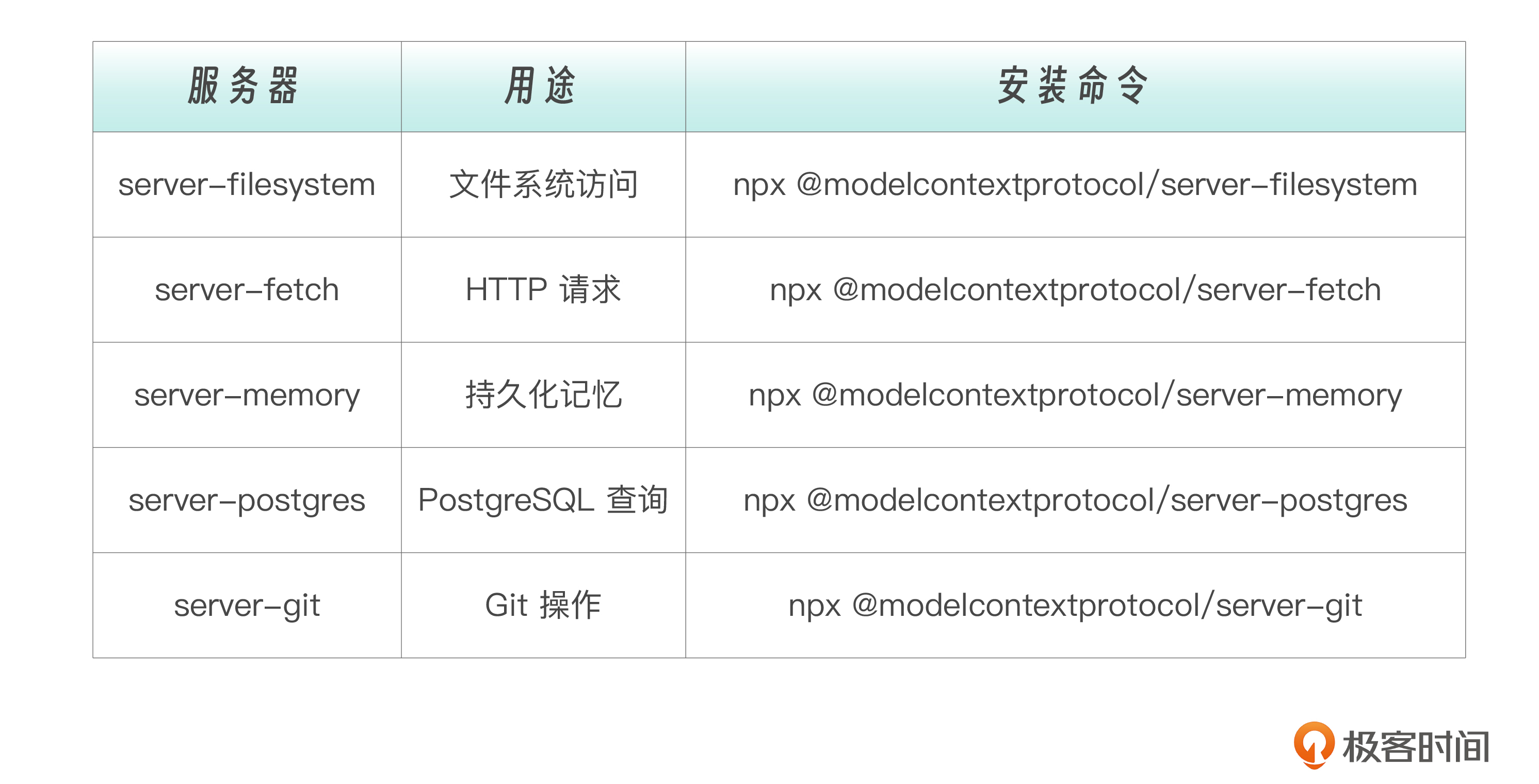
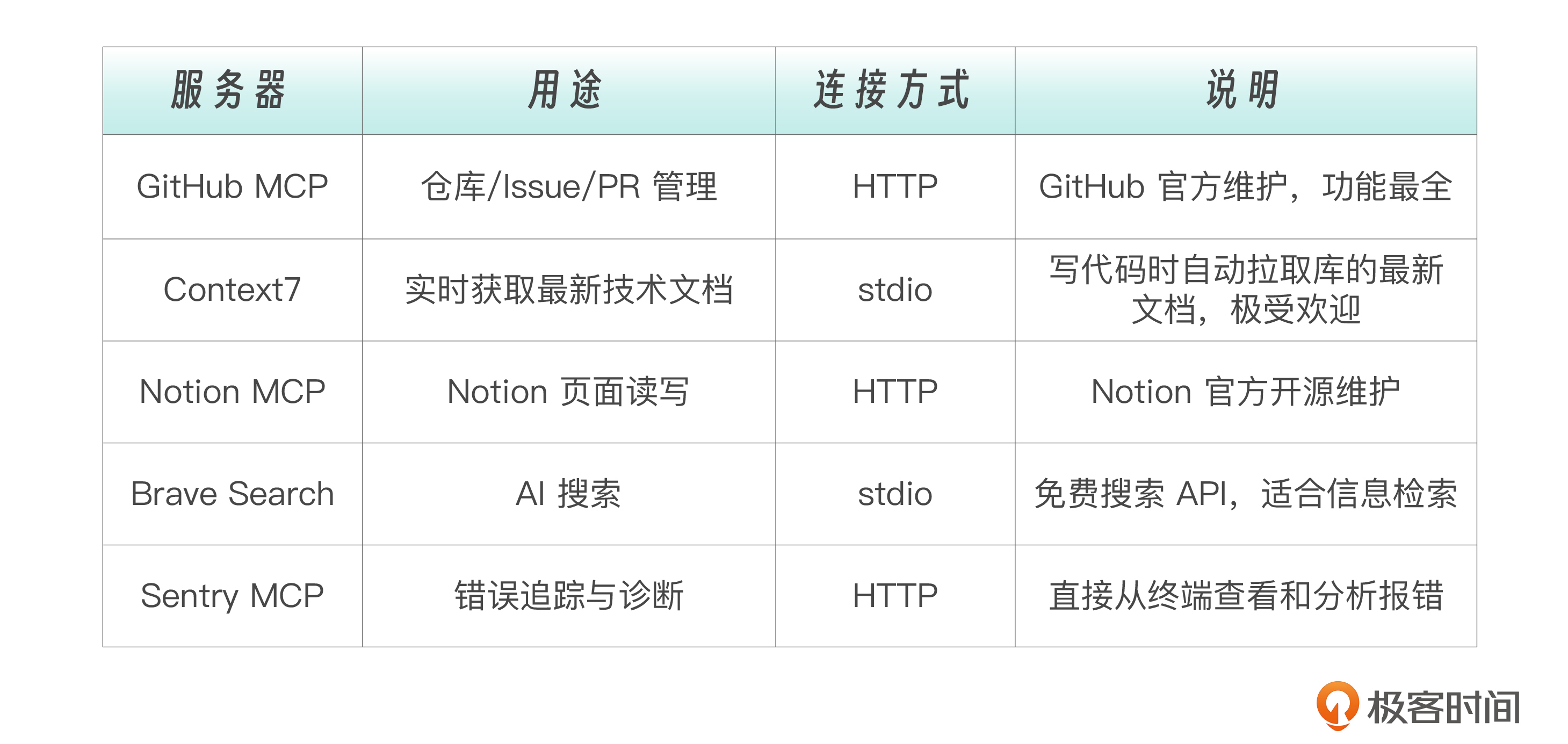
实战 1:Context7——实时技术文档
Context7 是开发者社区最火的 MCP 服务器之一。它的价值在于,当你让 Claude 帮你写代码时,Claude 可以实时拉取你用的库的最新文档,而不是依赖训练数据中可能过时的知识。
claude mcp add context7 -- npx -y @upstash/context7-mcp@latest帮我用 Next.js 15 的 App Router 写一个带认证的 API 路由 use context7创建自定义 MCP 服务器
import { McpServer } from "@modelcontextprotocol/sdk/server/mcp.js";
import { StdioServerTransport } from "@modelcontextprotocol/sdk/server/stdio.js";
import { z } from "zod";

// 内存存储
const todos = [
  { id: "m1", text: "买牛奶", done: false },
];

// 创建 MCP 服务器
const server = new McpServer({
  name: "my-todo-server",
  version: "1.0.0",
});

// 定义工具:添加待办
server.tool(
  "todo_add",
  "Add a new todo item",
  {
    text: z.string().describe("The todo text"),
  },
  async ({ text }) => {
    const todo = {
      id: Math.random().toString(36).substring(2, 9),
      text,
      done: false,
    };
    todos.push(todo);

    return {
      content: [
        {
          type: "text",
          text: `Added todo: ${todo.id} - ${todo.text}`,
        },
      ],
    };
  },
);

// 定义工具:列出待办
server.tool("todo_list", "List all todo items", {}, async () => {
  const text =
    todos.length === 0
      ? "No todos found."
      : todos
          .map((t) => `[${t.done ? "x" : " "}] ${t.id}: ${t.text}`)
          .join("\n");

  return {
    content: [{ type: "text", text: `Todos:\n${text}` }],
  };
});

// 定义工具:完成待办
server.tool(
  "todo_complete",
  "Mark a todo as completed",
  {
    id: z.string().describe("The todo ID"),
  },
  async ({ id }) => {
    const todo = todos.find((t) => t.id === id);
    if (!todo) {
      return {
        content: [{ type: "text", text: `Todo not found: ${id}` }],
        isError: true,
      };
    }

    todo.done = true;
    return {
      content: [{ type: "text", text: `Completed: ${todo.text}` }],
    };
  },
);

// 定义资源:统计信息
server.resource("stats", "stats://current", async (uri) => {
  return {
    contents: [
      {
        uri: uri.href,
        mimeType: "application/json",
        text: JSON.stringify(
          {
            total: todos.length,
            completed: todos.filter((t) => t.done).length,
            pending: todos.filter((t) => !t.done).length,
          },
          null,
          2,
        ),
      },
    ],
  };
});

// 启动服务器
async function main() {
  const transport = new StdioServerTransport();
  await server.connect(transport);
  console.error("MCP Server started");
}

main().catch(console.error);
{
"mcpServers": {
"my-todo": {
"type": "stdio",
"command": "node",
"args": ["./mcp-server/build/index.js"]
}
}
}MCP 原理
你写的这个 MCP 服务器,核心机制是这样的:

1. 通信协议:JSON-RPC 2.0
MCP 基于 JSON-RPC 2.0 协议。客户端和服务端通过 stdin/stdout(标准输入/输出)传递 JSON 格式的消息。每次消息格式:


{"jsonrpc": "2.0", "id": 1, "method": "tools/call", "params": {...}}
2. connect 做了什么(核心)
server.connect(transport) 这一步本质上是:


stdin  ← 接收客户端发来的 JSON-RPC 请求
stdout → 发送 JSON-RPC 响应回客户端
stderr → 打印日志(不影响数据通信)
工作流程:

客户端发起握手 → 发送 initialize 请求(协商协议版本、能力声明)
服务端响应 → 返回支持的能力列表(tools, resources 等)
客户端发送 notifications/initialized → 握手完成
正常通信:
客户端调用工具 → 发送 tools/call → 服务端执行并返回结果
客户端读取资源 → 发送 resources/read → 服务端返回数据
StdioServerTransport 底层就是 readline 循环读取 stdin,解析 JSON,路由到对应的 handler,再把结果 JSON 序列化写入 stdout
3. 你的代码映射

// 声明能力:告诉客户端我有这些工具
server.tool("todo_add", "Add a new todo item", { text: z.string() }, async ({ text }) => {
  // ...
  return { content: [{ type: "text", text: "..." }] };  // 返回 Content-Literal 格式
});

// 声明资源
server.resource("stats", "stats://current", async (uri) => {
  return { contents: [{ uri, text: JSON.stringify({...}) }] };
});
4. 整体架构

Claude Desktop / Claude Code (MCP Client)
       │
       │  stdin/stdout (JSON-RPC)
       │
       ▼
你的 MCP Server (node index.js)
       │
       ├── server.tool("todo_add", ...)    →  暴露工具
       ├── server.tool("todo_list", ...)   →  暴露工具
       ├── server.tool("todo_complete", ...)→ 暴露工具
       └── server.resource("stats", ...)   →  暴露资源
关键点:MCP 不是 HTTP API,而是通过标准输入输出流进行双向 JSON-RPC 通信。客户端启动服务端进程(spawn),通过管道连接 stdin/stdout,实现进程间通信。
通过开放协议将 Claude Code 连接到外部世界。GitHub、Notion、数据库……MCP 让 Claude 的能力边界从本地文件系统扩展到了整个数字世界